PaisaMaps for business
Product Platform overviewMap, signals, workspace and API in one tourLive mapSpending power for every pincode, six ways to see itWorkspaceProjects, store data, compare, reportsSignals & dataWhat we capture, from where, how oftenExpansion forecastFrom a budget to ranked sites and revenue rangesData API & exportsCSV, Excel, JSON and API keys
Solutions Retail & F&BWhere to open the next storeReal estate & hotelsCatchment demand for projects and propertiesLenders, NBFC & fintechArea-level affordability and market sizeAny businessD2C, franchises, services, SMEsAgencies & consultantsStrategy firms working for many clientsSite selectionRank candidate pincodesMarket sizingHouseholds × spend for any areaCatchment analysisWho lives around a siteCredit & affordabilityAn area input for lendingTerritory planningBalance sales territoriesPortfolio benchmarkingScore the stores you already have
Pricing
Resources How it worksBefore and after you sign inWhy PaisaMapsWhat's different, honestly comparedMethodologyHow every score is built, checked and labelledSecurityHow your account and data are protectedFAQProduct, data, pricing, securityHelp & supportGet an answer from a person
Open the mapTalk to us

For retail, café, QSR and pharmacy chains

Open where people can spend, not just where there's space.

A store that opens in the wrong pincode costs a year of rent and fit-out before anyone admits it. PaisaMaps shows which neighbourhoods can support your ticket size, so the shortlist starts with demand.

Café & QSRApparel & lifestylePharmacy & grocery

What you can achieve

Expansion decisions you can defend in the room

ObjectiveFind neighbourhoods that can carry your ticket size

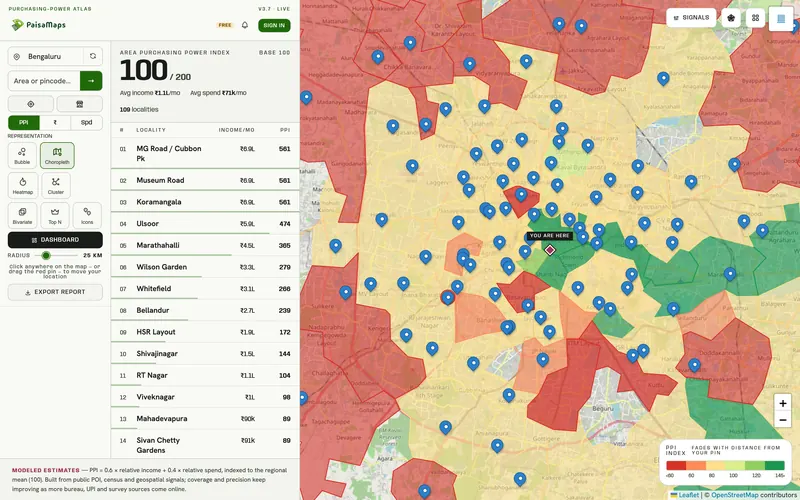
With PaisaMapsRank every pincode in a city by purchasing power, income and spend, with the top localities listed beside the map.

OutcomeA demand-led long list before the property team starts scouting.

ObjectiveCut a long list to the sites worth visiting

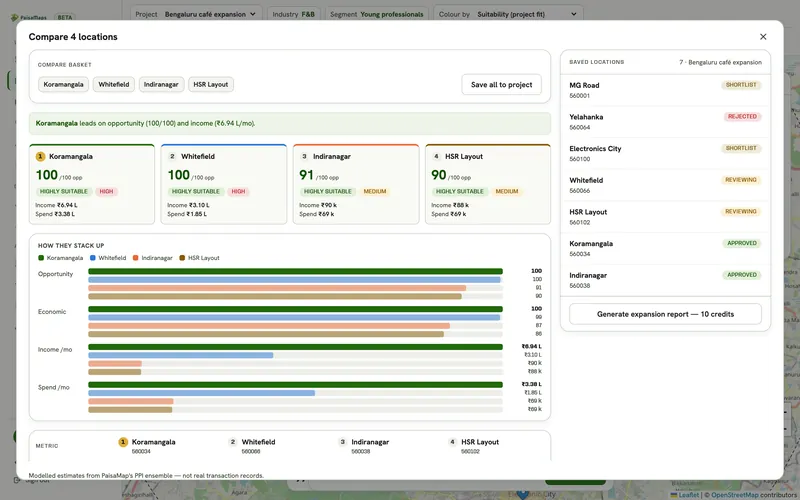
With PaisaMapsCompare up to five candidates on opportunity, income, spend, suitability and risk.

OutcomeFewer site visits, each one to a pincode that already passed on demand.

ObjectiveLearn what your best stores have in common

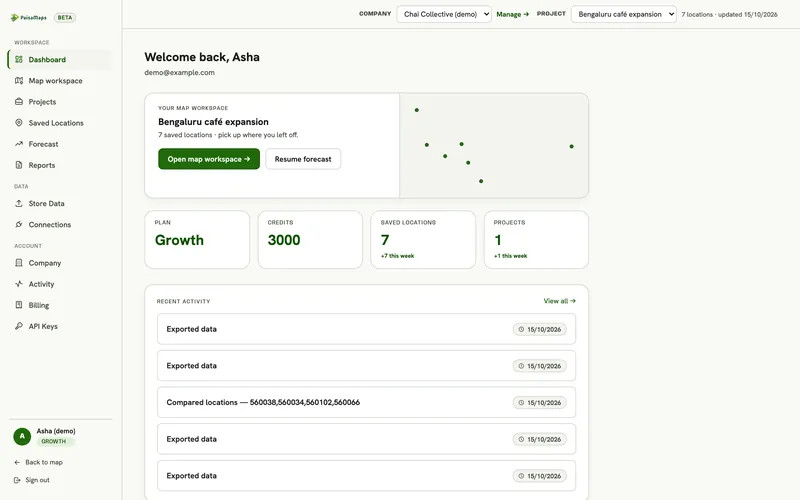
With PaisaMapsUpload your stores with revenue; each is scored against its area and the shared signals of your top performers surface.

OutcomeA profile of a winning catchment, built from your own results.

ObjectiveSize the next phase to the budget

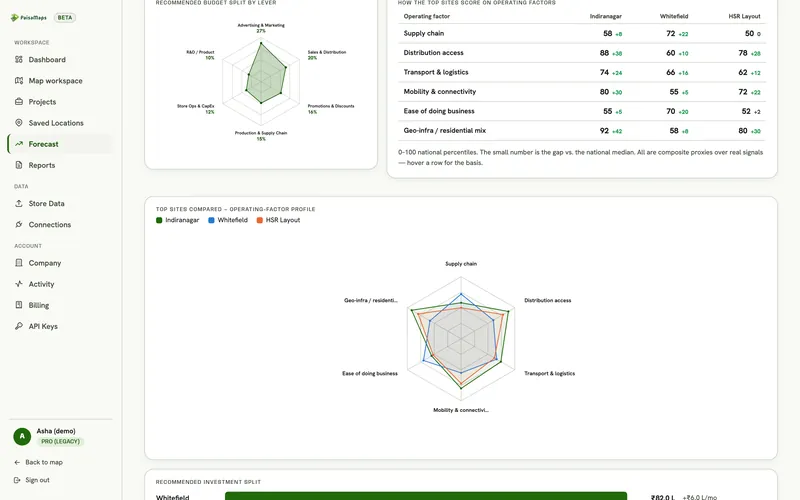
With PaisaMapsTurn an investment figure into ranked sites, reachable revenue and payback, every assumption on screen.

OutcomeA store count and a revenue range finance can test.

ObjectiveAvoid cannibalising your own stores

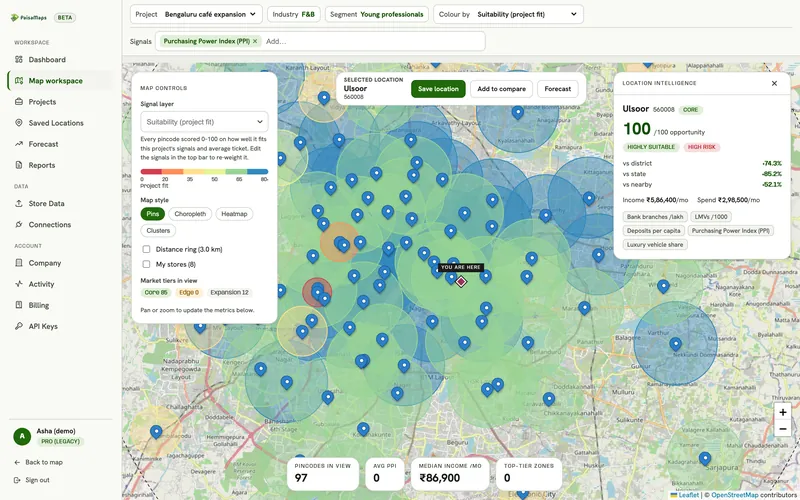
With PaisaMapsSee existing stores on the map with distance rings around candidates.

OutcomeNew sites placed where they add customers, not move them.

ObjectiveGet sign-off faster

With PaisaMapsGenerate a PDF report or a read-only link from the project.

OutcomeOne document the expansion committee reads instead of five spreadsheets.

Who's involved

Who uses it, who reads it, who pays for it

Uses it every week

  • Expansion manager
  • Business development lead
  • Category / network planning analyst

Builds the long list, compares sites, uploads store data and runs the forecast.

What they getA shortlist with reasons, in hours instead of weeks.

Reads and decides

  • Head of expansion
  • COO
  • Expansion committee

Reviews the comparison and the forecast, approves or rejects sites.

What they getOne report per decision, with the demand case and the risks.

Pays for it

  • Head of expansion
  • CFO
  • Founder (in growing chains)

Owns the expansion budget the workspace is bought from.

What they getFewer stores opened in the wrong place; capex that follows demand.

A business case, start to finish

A café chain picks its next three Bengaluru sites

Illustrative example, not a customer story
  1. Paint the cityColour Bengaluru by purchasing power and read the ranked list of localities.
  2. Drop the weak candidatesFour of the eleven sit in the bottom half of the city on spend; they go.
  3. Check overlapDistance rings show two candidates within a short drive of existing stores.
  4. Compare the restThe remaining five go side by side on opportunity, income, spend and risk.
  5. CalibrateThe brand's own store revenues show its best stores share high car ownership and UPI use; the forecast learns from them.

The decision

Three sites approved: the two strongest on opportunity, and a third that ranked slightly lower but has no overlap with existing stores.

What the team walks away with

  • A ranked shortlist saved to the project, with notes
  • A forecast with a revenue range per site
  • A PDF for the expansion committee

Why PaisaMaps

What makes it different for a store network

Pincode-level, India-wide
Spending power for every scored pincode in the country, on one map, not a city study at a time.
Your stores in the loop
Your own store revenues calibrate the forecast, so it reflects how your format actually performs.
Honest about what it is
Modelled estimates are labelled; we don't claim footfall or transaction data you'd have to distrust later.
Ready the same day
No GIS team or integration project: open the map, then plan in a shared workspace.

Getting started

How teams roll it out

Day 1

Open the free map on your cities and see where spending power concentrates.

Week 1

We set up your workspace and walk through your candidate list with you.

Week 2

Upload your stores with revenue; see your winning-catchment profile.

Every expansion

Shortlist, compare, forecast and send the report for sign-off.

Signals that matter here

Which signal answers which question

Every plan sees purchasing power, income and spend. These are the signal groups that move this decision.

Signal groupWhat it tells youThe decision it feeds
Purchasing powerHow much a typical household earns and spends, and how that ranks in its stateWhere your price point has enough customers; which sites to shortlist
Banking & UPIHow banked and how digitally active an area isWhere credit, payments or premium products will be adopted first
VehiclesCar ownership, the car-to-two-wheeler mix, luxury and EV sharePremium vs value positioning; parking-led formats; mobility products
PropertyA city-level estimate of property ratesRent and capex context for a city (not a valuation)

Each signal's source and level (pincode, district or state) is listed on the signals page.

Use cases

The decisions it supports, and how

Use caseHow retail & f&b teams use it
Site selection →Ranks a broker's offers on demand before anyone visits; checks overlap with existing stores.
Market sizing →Sizes a new format or a new city before committing stores to it.
Catchment analysis →Checks a site's catchment against those of the brand's best stores.
Portfolio benchmarking →Finds stores under-performing their market and the profile of the winners.

Before you buy

Questions we hear

Can it tell us footfall?

No. We don't have footfall or transaction data. We show what households around a site can spend, which complements the footfall counts you already take.

We already have a GIS team. Why add this?

Building and maintaining pincode-level spending power from public sources is the slow part. Use our exports and API in your own tools, and the workspace for the decisions.

How accurate is it for a single site?

It's built to compare areas, not to predict one store's sales. That's why the forecast gives a range and calibrates to your own stores.

How do we start?

Open the free map for your cities, then talk to us: we set up the workspace with you so you can compare sites and run the forecast.

Bring us your candidate list

Send the pincodes your broker shortlisted; we'll rank them with you on the live data in about 20 minutes.